


You can now automatically send information to Workflowy from thousands of applications like Google calendar, Slack, Reddit, and Pocket. Automate everyday tasks like – creating a meeting bullet when a new event is added to your calendar, forwarding your mentions from slack into your today bullet, creating recurring tasks with Google tasks, and much more, all without leaving Workflowy.
You can now centralize multiple streams of information in one single app – allowing you to build upon and transform it with all the power Workflowy has to offer. All you need is a free Zapier account and to follow a few simple steps to get started.
There are two important things to note:
1. You can only currently send information to Workflowy, not receive it from Workflowy.
2. There is a Google policy that prevents @gmail.com and @googlemail.com accounts from sending information to many apps, including Workflowy. We have a template with a workaround for that.
What is Zapier?
Zapier lets you connect different applications to create automated workflows. An action or event in one application starts the workflow, which then triggers a second step you specify in another application.
With Workflowy now available in Zapier, you can do things like record a voice memo on your mobile phone and have Zapier automatically transcribe it and send the transcription to your Workflowy inbox – without having to think about where to put it or oven open Workflowy.
How to get started with the Zapier integration
- Have a Zapier account and be logged in.
- Know how to make a Zap.
- Get an api key to connect your Workflowy account to Zapier (you have to be logged in to Workflowy for this page to work).
- Get started with any of our Zapier templates below.
If you run into any issues with the setup process we also have a help guide.
Zapier templates
With so many possibilities, we’ve included a handful of practical templates to give you some ideas and get you started building your own custom ‘zaps’. These are some simple ways to send common information straight to Workflowy without losing your flow.
To see even more zaps with templates – check out our integrations library.
1. Email text snippet to Workflowy
Imagine you’re on your phone, you find a great article for your blog. Instead of losing it in your bookmarks, use your phone’s ‘share to email’ feature to send the content straight to Workflowy. You keep your focus, and the article is safely stored.

2. New calendar events to Workflowy
The next time a calendar event is created, say by a calendly request or a colleague inviting you to a team meeting – it’s also added to your Workflowy. Now you’ve got a nice reminder of the meeting in your todo list and a placeholder to put all those meeting notes so they don’t get lost and can be turned into tasks if needed.

3. Recurring tasks in Google tasks to Workflowy
We all have tasks we do on a regular basis and need to be reminded of. This can be as simple as a reminder to pay a specific bill, do some sort of maintenance to our home, or simply exercise. Now, just add all those items to google tasks and they’ll automatically show up in any Workflowy list you want – exactly when they’re supposed to.

4. Zapier RSS to Workflowy
Essentially, every single blog on the web has an RSS feed that you can connect to with zapier and have the information sent to your Workflowy. Say you’re a scientist who wants to keep up with the latest research and regularly check several journal websites to see the latest papers. Now you can have them put into a single stream in your account and you can add your notes as you review them.

5. New Dropbox file links to Workflowy
Imagine you’re working with a freelancer who’s sending you videos or audio files you need to review. Instead of asking them to email them to you or mess with file hosting apps and permissions, this zap automatically shares the dropbox preview link to your Workflowy account whenever a new file is uploaded. Making it painless to write the review in Workflowy and share it with them to keep the ball rolling.

6. Google form responses to Workflowy
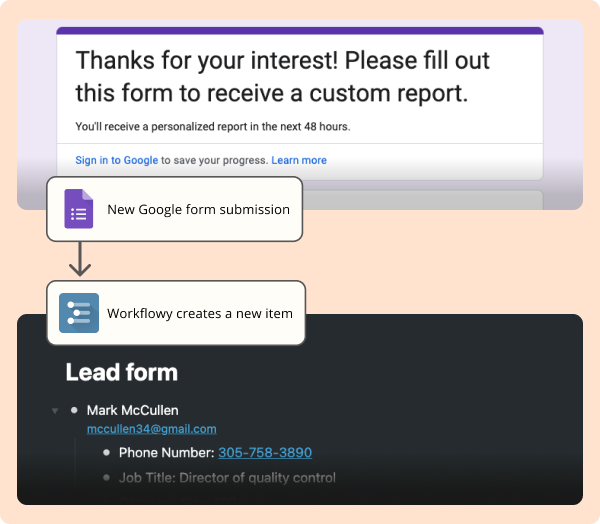
Say you’re in sales and use a google form to handle requests for more information. Now those submissions will show up automatically in your account ready for you or your team to start working on them directly in Workflowy – no more checking emails or google sheets for new leads.
Share your zaps with us ⚡️
We would love to know how you’re using the zapier integration and share your most useful flows with the rest of the Workflowy community. Please share those zaps in the comments so we can add them to our growing library.
See you in the next one.