
Hey there Workflowy folks, we’re excited to announce the addition of several new text formatting options – including our most requested text format, code blocks.
Code Blocks
You can now paste any code inside Workflowy and have it displayed in a code block.

To try it out ✨
- Put your cursor on a blank item
- Type three backticks
``` - Paste your code into the code block
- To exit code block mode hit ENTER three times
You can also search for code blocks and their contents using the new search operator ‘is:code-block‘. In the screenshot I’m searching for code blocks that contain ‘load’.

Inline code snippets
We’re also adding an inline code formatting option in the text format widget so you can include lines of code throughout your regular text.

To try it out ✨
- Highlight some text
- Hit the keyboard shortcut Cmd / Ctrl + Shift + C
There’s also a new search operator ‘text:code‘ that lets you search through these inline code snippets. The results also return matches where the text you’re searching for occurs around the code snippet.

Quote blocks
You can now also create quote blocks to clearly indicate when you’re referring to something someone else wrote or said.

To try it out ✨
- Put your cursor on a blank item
- Type > then hit the spacebar
- Type or paste your content
- To exit quote mode hit ENTER two times
Quote blocks also come with their own search operator ‘is:quote’.

Strikethrough
Last but not least we have strikethrough text. You now can select any text and choose the ‘strikethrough’ option in the text format widget. This addition makes it easier to leave information intact while indicating it’s not currently relevant – this is extra useful if you’re collaborating with others in Workflowy.
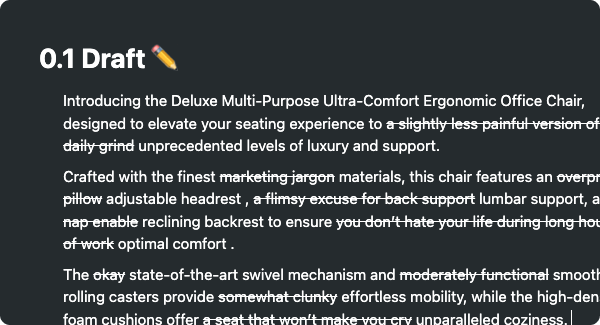
To try it out ✨
- Highlight some text
- Hit the keyboard shortcut Cmd / Ctrl + Shift + X
And there you have it, new text formats that open the door to even more possibilities with Workflowy.
Let us know what you think in the comments below.
Until the next one!
please add line numbers, syntax highlighting + language selection, folding
love the feature: quote verrrrrry much !!!! love it!!!!!
Just came specifically to say: thank you for this.
I have markdown editor muscle-memory, and often launch in to composition in WorkFlowy using the beginning-of-line operators (##, >,
`) … and then remember formatting isn’t a thing. This was never a blocker, but always something I’d stumble over and would slow down composition.The other day, I did the usual thing, where I started typing a line “> something something…” and poof! it was a formatted link. Eureka! Imagine my surprise.
Now that I’ve got it, I didn’t realize how much I was missing not having it.
WorkFlowy is the tool I reach for first for putting pen to paper and jotting down notes … but it didn’t suit me as well for just vomiting information on to a page. The “paragraph” object type along with this text formatting allows it to break out of the rigidity that’s premature for some things, while having it there whenever it begins to make sense.
We’ll see if this bridges the gap, or if composition and structuring are really so different that they must happen in different places. But so far, I’m liking the way it feels.
Good work. Keep it up.
Thank you very much, I have been waiting for this feature for a very long time. It was the only reason I didn’t use Workflowy as my primary notebook.
Thanks Lukáš from Czech Republic
Thank you, thank you, thank you! I’ve been waiting on code blocks for years and having them now allows me to use Workflowy for so much more.
Am I missing something, or is it still not available in the Windows desktop app? It works fine on mobile and web.
OK, the app just stopped updating. After manual installation of the new version, it works.
Great! Now ideally I could have a function to turn all those comment blocks I put my code into, into code blocks without having to first cut the code out, then create the subitem, declare it a code block, and paste the cut text there.
Code blocks work in comment blocks too, so you just need to select them and set them as a code block
Very nice, that the little formatting menu stays visible to add more than just one format 🙂
Great option with the quote function. But how can I “unquote” a bullet if I want to change it back?
You can hover the quote with the mouse and then use the “three point menu” at the left. There is an entry “Turn into…”
Hi. I’ve been waiting and asking for code formatting for years and I’m very glad it arrived!
But, the first ever problem why I needed it didn’t fully get solved yet. Look at this example:
Run
bash ./script.sh and navigate to…
I literally typed that in Workflowy and then copy-pasted here.
As you can hopefully see, the “script.sh” file name has become a formatted link to http://script.sh/ despite being typed in an inline code (I was typing with single backticks before “bash” and after “.sh” to make inline code).
If you can fix that, it would be very very great.
100% this. The autolinking is very annoying
Love it all. Been using it for a few days, all awesome. Thanks for the work, team ❤️
hooray! so glad these formatting options are finally here!
Everything works really well – thanks team!
Excelente!!! El bloque de citas es de gran utilidad para mis minutas. Chicos, realmente me alegra ver que siguen trabajando en nuevas características. Sigan así !!!
Finally, the exciting code support has arrived.
[…] […]
[…] […]
[…] […]
[…] […]