
Hey there Workflowy folks, today we’re making it easier to work with templates from anywhere in your account.
Now, instead of having to keep templates close to where you’ll use them – you can use the new slash command to quickly search through all your templates and insert the one you’re looking for.
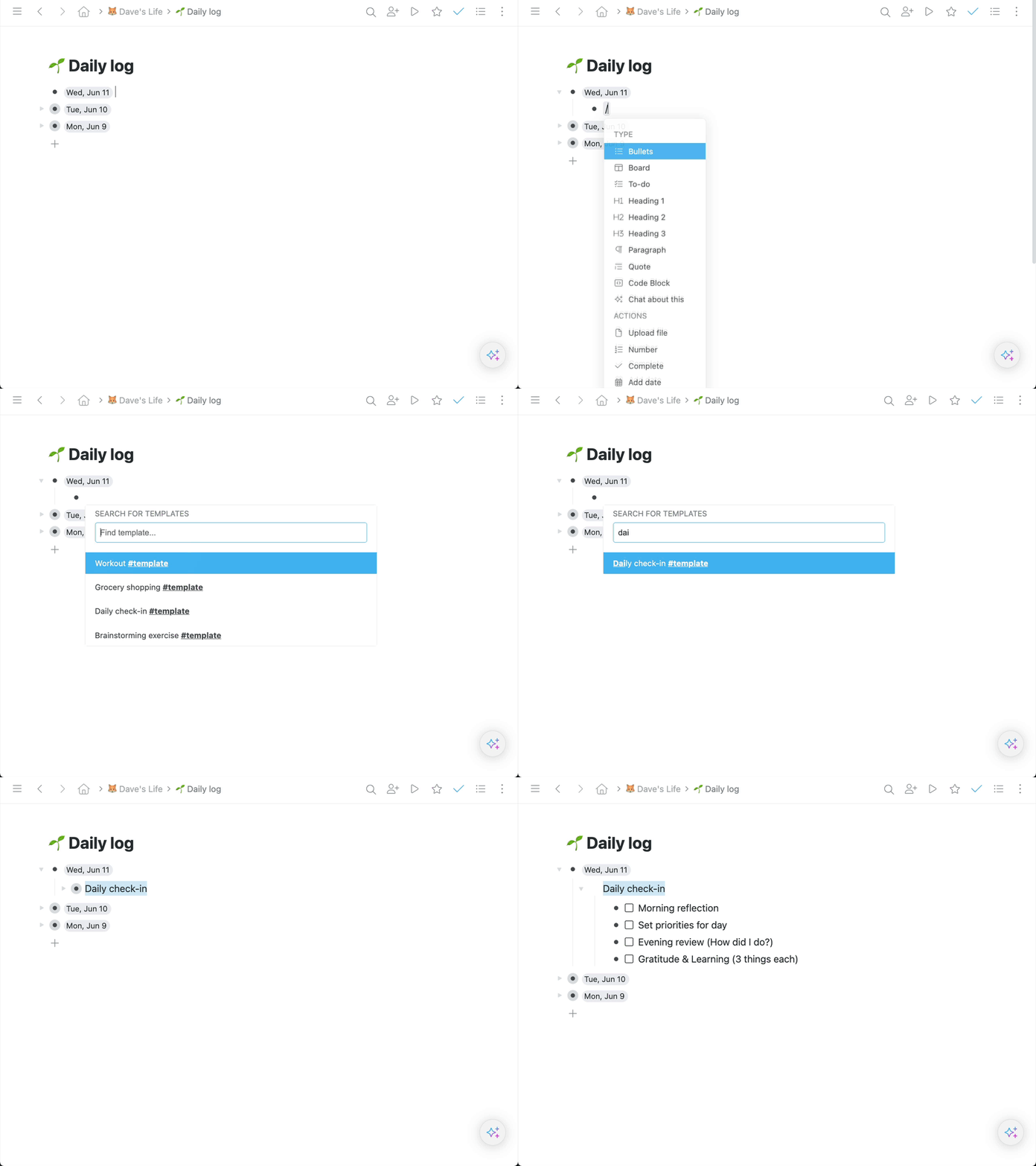
How to use it
- Place your cursor where you want to insert a template
- Type ‘/Add from template‘ or ‘/template‘ for short
- Find the template you’re looking for and hit ENTER to insert it
Let us know what you think about this update by commenting below!
Until the next one!


Great addition. This will make it much easier to use template, and is an encouragement to creating more of them.
Fantastic addition to a great product!
Simply amazing! Thank you for this feature!
Great!
A very useful feature!!
Thank you and keep the good work!!!
Thanks. Works well!
This is a great feature! It will greatly improve speed and productivity! Keep up the great work!
Genial !!! Era algo que quería y necesitaba. Felicitaciones y abrazos al Equipo
Super dope! Thanks Rodolfo & team