
Nora, a seasoned designer, web developer, and business owner, has mastered the art of project management. She effortlessly manages dozens of projects in Workflowy, maintaining a clear vision and sense of control despite the constant flow of incoming tasks. However, Nora’s journey to productivity mastery didn’t always run so smoothly.
In her early career, Nora struggled with organization and project management. She bounced from one ineffective system to another, drowning in a sea of printed emails and overstuffed binders. The chaos threatened to derail her business and crush her creative spirit.
This post will take you on Nora’s journey from overwhelmed freelancer to workflow wizard. You’ll discover how she harnessed the power of Workflowy to streamline her processes, reclaim her time, and unlock her full potential. We’ll dive deep into Nora’s productivity secrets, exploring her innovative use of templates, mirroring, and integrations. Whether you’re a freelancer, small business owner, or anyone seeking to boost your productivity, Nora’s story will inspire you to upgrade your own workflow.
The challenge: binders full of printed emails
Nora’s early days as a designer brought frustration and anxiety as she dealt with an overwhelming sea of paperwork. She spent countless hours printing client emails and documents, meticulously organizing them into clear plastic binders that lined her office shelves. This cumbersome process left her feeling drained and inefficient, longing for a better way to manage her projects.
As digital organization tools started to become more widespread, Nora’s hope surged, only to be quickly replaced by disappointment. She bounced from one project management app to another, each promising to streamline her workflow but ultimately falling short. The rigid structures of these tools clashed with Nora’s creative process, leaving her feeling constrained and even more stressed than before. She longed for a solution that would truly fit her needs and bring order to her chaotic work life.
Nora found herself locked in a constant battle against these inflexible systems, searching for a tool that would work with her, not against her. Then one day, she stumbled onto a YouTube video about Workflowy. In that moment, everything clicked for her.
Workflowy felt like a breath of fresh air. Nora at last had an app that gave her the flexibility to organize her work in the way it made sense for her. With relief and excitement, Nora finally said goodbye to her army of plastic binders, holding on to them only for posterity, embracing a digital workflow that truly understood her needs.
Workflowy: The only app better than paper
As Nora explored Workflowy’s intuitive interface, her excitement grew. The app’s simplicity and flexibility resonated with her organizational needs, giving her a digital canvas that mirrored her thought processes. She felt relieved as she began to transfer her scattered ideas into neatly organized bullet points.
“I think the problem that Workflowy solves is being able to activate everything together in one area rather than being all over the place.”
With each new bullet she added, Nora’s anxiety melted away. The ability to zoom in and out of her projects gave her a sense of control she had never experienced before. She was surprised at how effortlessly she could reorganize her thoughts, feeling a newfound clarity and purpose in her work.
“I can just go right into the single project and work on it without being overwhelmed with all of the projects I have for this person.”
As time went by, Nora’s productivity reached new heights. The burden of disorganization lifted from her shoulders, replaced by a sense of accomplishment and pride. Workflowy had become more than just another app she used, it had transformed into her trusted sidekick.
Nora’s Secrets to Managing Dozens of Projects in Workflowy
After a decade of running her business with Workflowy, Nora’s has transformed her workflow into a well oiled project management machine.
Now let’s take a look at the key components that make Nora such a productivity powerhouse and have given her the flexibility and bandwidth to handle any client with confidence and ease.
Templates as productivity power ups
When a new client enters her digital workspace, Nora doesn’t start from scratch. Instead, she pulls from her arsenal of custom templates, each designed to capture essential information quickly and effortlessly.

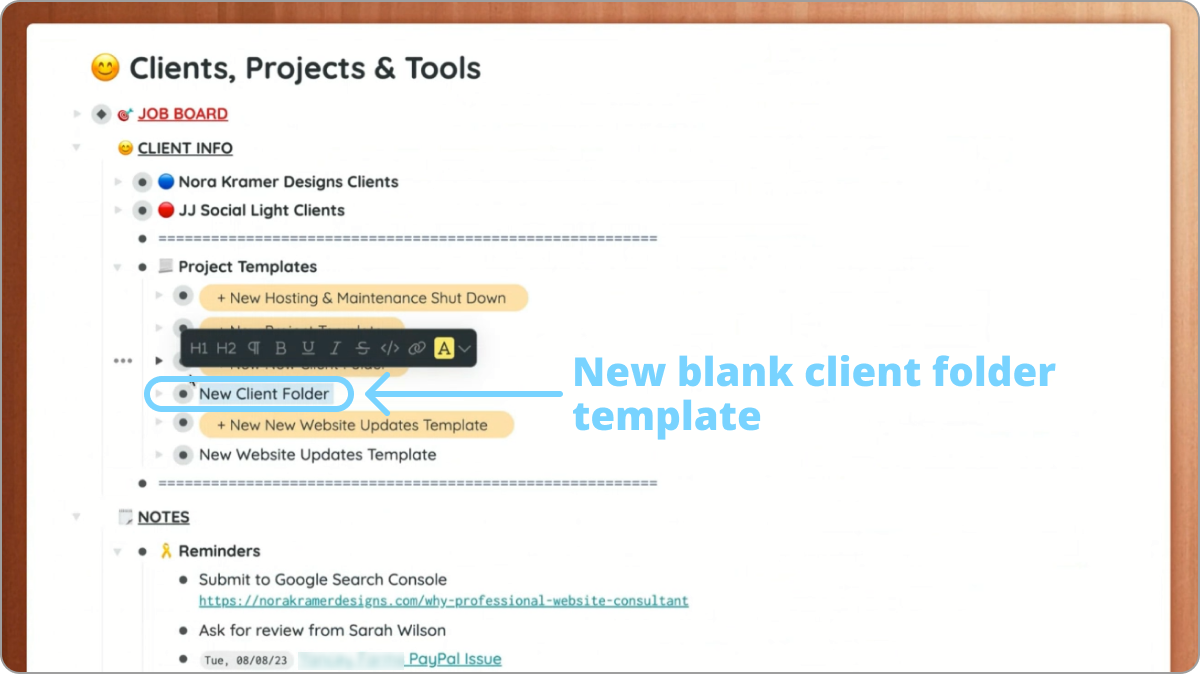
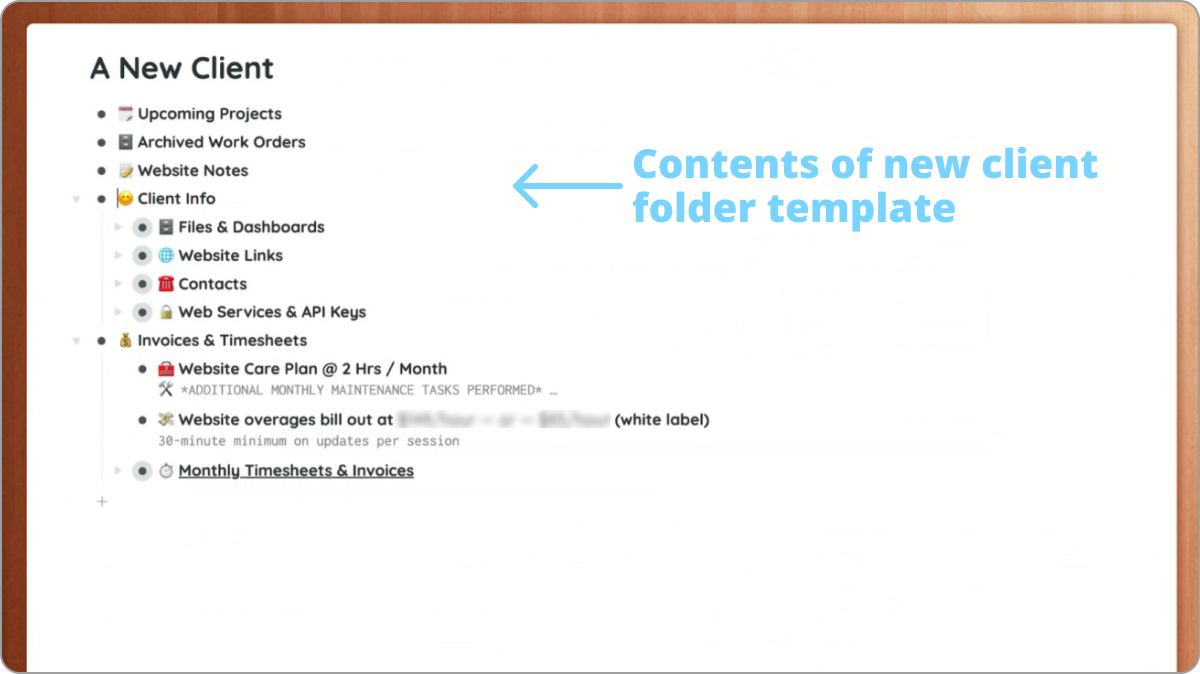
These templates act as Nora’s digital playbooks, laying out common tasks in a logical sequence. With a few quick clicks she can craft a new project using a proven framework. She simply adds the details and due dates, transforming a generic outline into a custom project plan in minutes.
This approach not only saves Nora valuable time but also presents a polished, professional image to her clients from day one.
Centralized task management with mirrors
Nora organizes her business section with a bullet for each client. Within these client bullets, she nests one or more project bullets. Each project contains tasks that she then mirrors to a centralized list she calls her “Job Board.”


This “Job Board” functions as Nora’s command center, a master todo list that brings order to the potential chaos that looms over every business owner. Every task on this board features a date tag for due dates, a link back to the client’s bullet for quick reference to project specifications, and descriptive tags to categorize the type of work required.
This centralized setup empowers Nora to maintain laser focus on her current task while keeping an eye on what lies ahead. She can easily prioritize her workload and track deadlines without getting lost in the details of individual projects. The “Job Board” acts as her digital assistant, ensuring she stays on top of her game and delivers quality work to all her clients, no matter how hectic things get.
Staying in the flow with tagged tasks
As Nora tackles her daily workload, she clicks on specific tags in her “Job board” to filter and group related activities. This simple action unveils a gem of efficiency, batching similar tasks.
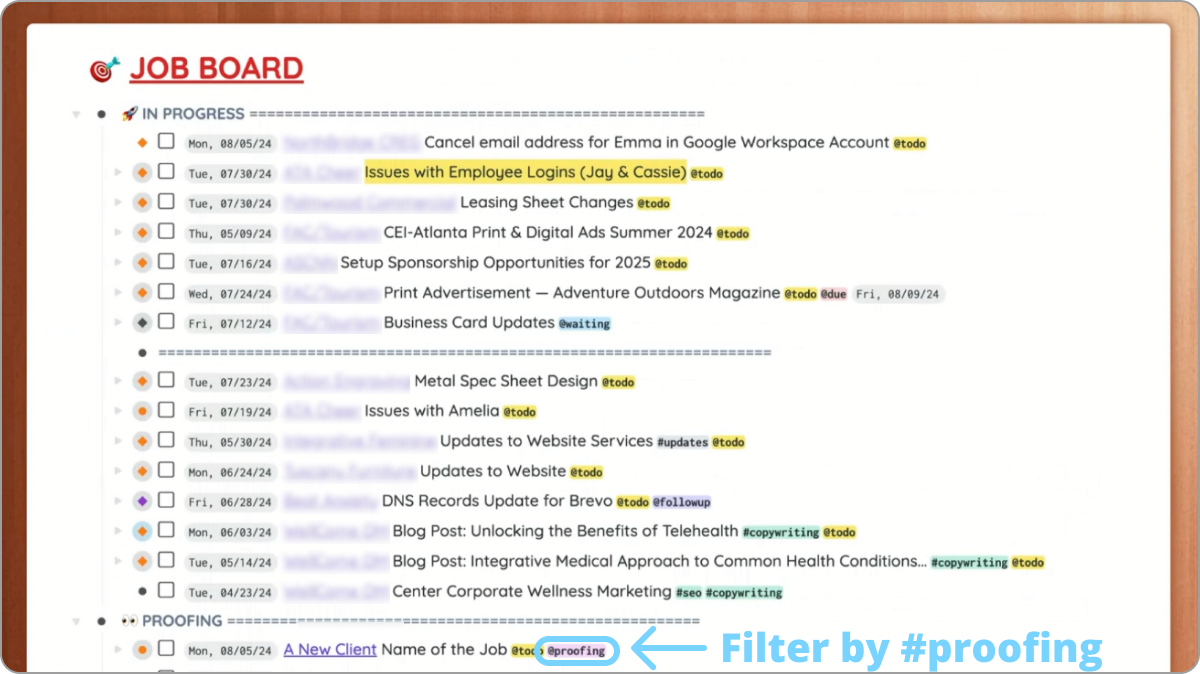

This batching strategy gives Nora a significant edge. It allows her to juggle more clients while maintaining top notch quality in her work. By grouping similar activities, she minimizes the mental cost of context-switching and maximizes her creative output.
Curating a treasure trove of knowledge
With decades in her industry, Nora has amassed a treasure trove of knowledge. Rather than letting this valuable information disappear into the ether, she’s transformed it into a dynamic, digital encyclopedia within Workflowy.
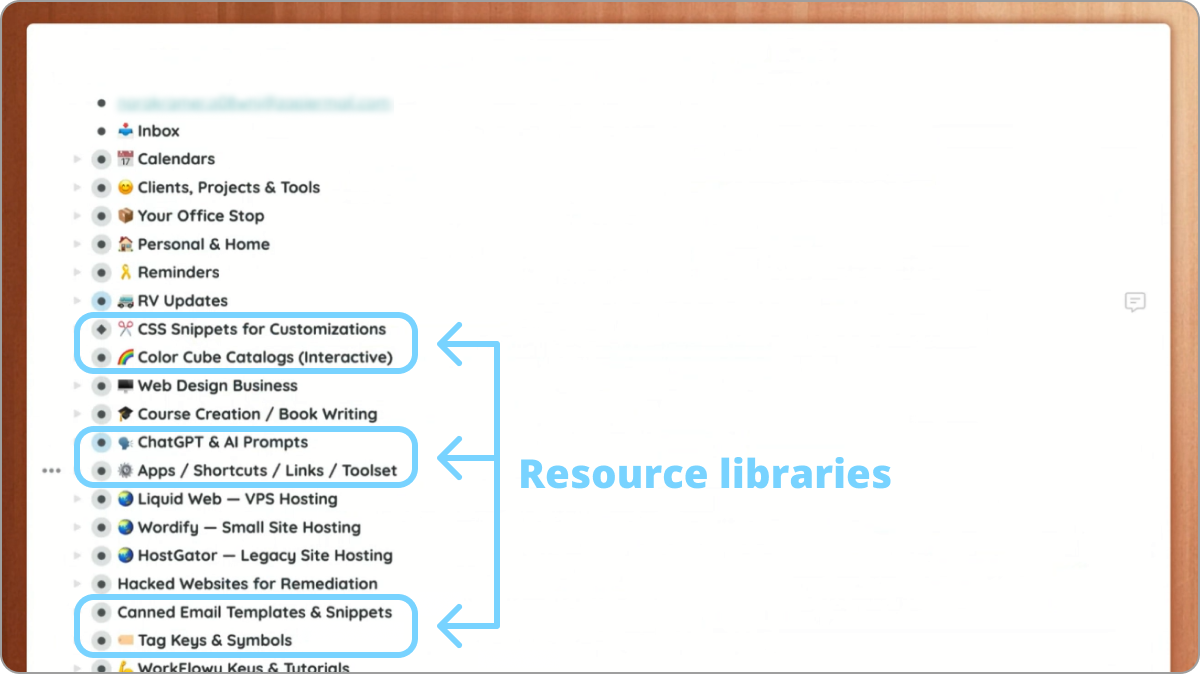
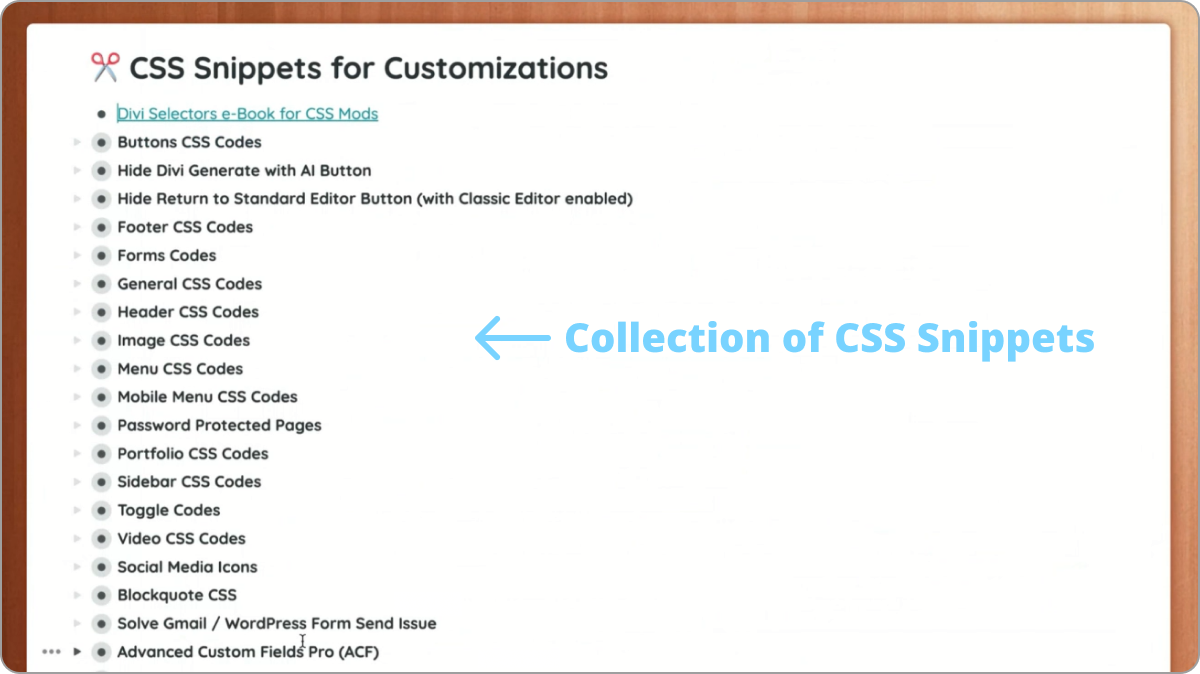

This mass of information doesn’t just sit idle. Nora harnesses Workflowy’s lightning-fast global search feature, turning her knowledge base into a powerful, instantly accessible resource.
Everything from CSS to align an element, a great outreach email template, or even a handy AI prompt, whatever she needs, quick search highlights it in seconds.
Skipping the inbox with zapier
Nora’s inbox once threatened to become a constant distraction, pulling her attention away from her work with every new client email. But she’s turned this potential productivity killer into a streamlined part of her workflow, thanks to a handy zapier integration between her email and Workflowy.
The moment a client email hits her inbox, Zapier sends the message directly into her Workflowy account. This automatic handoff ensures that no request falls through the cracks, while allowing Nora to maintain her concentration on current tasks.

Then, when Nora’s ready to process these incoming requests, she simply turns to her Workflowy inbox. From there, she effortlessly sorts each item, nesting it under the appropriate project and mirroring it to her “Job Board.”
Nora’s Complete Digital Conversion
Nora’s office still houses those plastic binders filled with emails and documents from her past, serving as a physical reminder of her journey and a potential resource for returning clients. However, her current business operations have evolved far beyond these binders. She has fully embraced the digital age, with Workflowy standing as her comprehensive database.
When physical documents cross her path, Nora quickly transforms them into digital assets. She scans each paper, uploads it to Google Drive, and creates a direct link inside Workflowy. Once digital and securely stored, she confidently shreds the original, maintaining her streamlined, paperless workflow.
This transition to a completely digital system showcases Nora’s adaptability and forward-thinking approach. Her story shows how Workflowy’s simplicity and flexibility empower users to craft a personalized system that outperforms any default solution. Nora didn’t achieve this overnight, she began with the most basic elements of her workflow and gradually expanded, refining her process over time.
Tell us your story
We would love to hear from you! If you’d like to share how you use Workflowy with the community, send us a short email and we’ll get in touch.
Now I see how to setup workflows for my business. Been way too busy to figure it out for myself. You made it so easy for me:) Thank you!
This is great content and thought-provoking. Thanks for sharing. I love WorkFlowy and have been using it to manage my life and customer projects for a few years now. What this really shows me is how customizable WorkFlowy is. She’s clearly designed a system that works for her and improves project management and communication with her customers. I’m still working on going 100% digital and WorkFlowy is a big part of being able to do that!
Too emotional an repetitive. It could be times shorter. But as any experience, it definitely has grains of gold.
Imagine don’t have to mirror every task!
If a search node was available, Nora wouldn’t have to do it manually with the risk of missing a task by mistake… and make a client angry.
Interesante. Sería genial tener un video para ver su sistema en acción
Found this very beneficial. Thanks for sharing your workflow with us.