
This week we had a chance to speak to one of our long-time users, Guido Gaudlitz. He graciously shared his experience with Workflowy with us and gave us a peek into how he stays organized and productive not only in his professional life but across his various interests. We hope you find his story interesting and maybe pick up a thing or two you can apply in Workflowy yourself.
Meet Guido
Guido is a 45-year-old lawyer based in southern Germany, specializing in internet, IT, cybersecurity, data protection, and telecommunication law. He works as a security officer in a telecommunication company and has been using Workflowy since 2015-2016.
Guido’s daily work demands highly structured thinking and the ability to access specific information quickly. Beyond his professional life, Guido is a devout Christian with a keen interest in Bible study, exegesis, and church history. He’s also learning Mandarin, which requires meticulous organization of language patterns and vocabulary.
The Challenge
Before discovering Workflowy, Guido struggled with information overload and the complexity of other note-taking and project management tools. He expressed frustration with applications that offered too many options, leading to decision paralysis:
“I have a sort of ADHD brain that is, when I see, for example, Notion, there are too many options…. And I think, well, is it better to make it in the table or a database?”
This sense of being overwhelmed with options often resulted in wasted time and inefficiency:
“At the end of the day, I looked at my watch and I said, well, I’m not happy with what I was doing. I’m looking at youTube videos for two hours, trying to learn about what I can do with Notion, and how to create it.”
Workflowy for everything
Guido found his solution in Workflowy’s simplicity and flexibility. Since he began using Workflowy it’s become his primary tool for organizing both professional and personal information. Guido appreciates Workflowy’s minimalist interface, stating,
“I like it … it’s really simple because I need that.”
He uses Workflowy for various purposes, including:
Organizing legal and compliance information
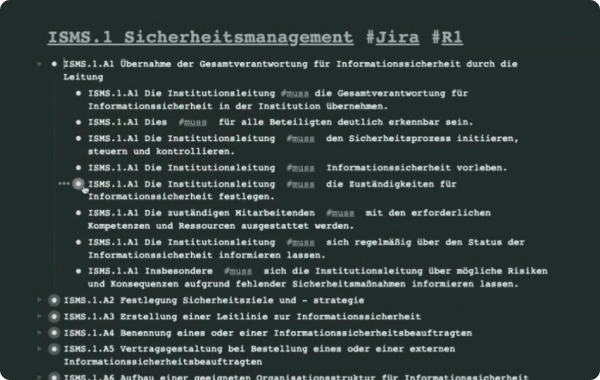
This screenshot shows how Guido keeps German requirements and recommendations documentation in his account. He tags each section so he can then quickly filter them to see which are absolute requirements and which are recommendations.

This screenshot hows him filtering the document to only display the ‘#muss’ items that need to be followed to be in compliance with the law.
Guido uses Workflowy extensively for managing complex compliance projects, particularly related to new cybersecurity regulations from the European Union. He puts all relevant law inside Workflowy and tags it so he has a personal wiki he can reference at any time. Due to the delicate nature of Guido’s work, he’s careful to not store any company information in his account and only uses Workflowy as his personal legal library and knowledge repository.
Structuring Bible study notes

In this screenshot we can see where Guido keeps his biblical study notes, and how he groups them based on his different study activities.
For his Bible studies, Guido maintains several types of information within Workflowy including Bible verses and a Greek dictionary he’s compiling.
Guido uses Workflowy’s hierarchical structure to analyze Greek words in depth, exploring their meanings in different contexts. This helps him avoid being “prey to different theories” and allows him to conduct thorough, personal analysis of biblical texts.
Managing Mandarin language learning
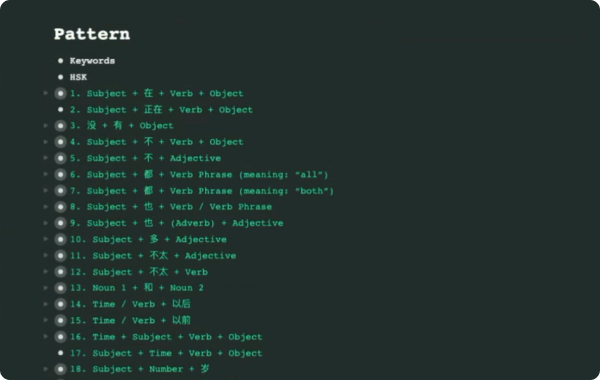
This screenshot shows how Guido groups common Mandarin sentence patterns and their explanations in his library for easy study sessions.
Guido uses Workflowy to organize his Mandarin studies, particularly for vocabulary and language patterns. He structures his Mandarin learning materials in the following way:
- He numbers the patterns he needs to learn
- Then under each pattern, he includes Mandarin sentences that exemplify the pattern
- He can quickly structure Mandarin sentences according to the main patterns he’s collected
- He adds translations or links to other Mandarin characters as needed.
- Finally, Guido also uses Workflowy’s presentation mode as a flashcard tool for reviewing his Mandarin vocabulary, finding it “great for learning.” He mentioned that he previously used RemNote to do this but found Workflowy’s simple interface much easier to use.
Creating to-do lists and calendars

This screenshot shows how Guido keeps a running list of dates for the entire year. Under each date he keeps track of important tasks and time sensitive activities for each day.
Guido maintains a simple calendar list within Workflowy. He imports tasks and appointments from his company Outlook into Workflowy, allowing him to see all his commitments in one place. He appreciates the simplicity of this system, stating that as he’s gotten older, he’s come to value simplicity and focus on core functionalities.
A recent challenge
When asked about a recent challenge or project he solved with Workflowy, Guido described a compliance project related to a new cybersecurity regulation from the European Union.
Specifically, he mentioned:
“We have a new regulation in Germany cyber security regulation from the European Union… that’s a project where Workflowy is really useful to keep track of everything … We have a group of 12 different companies and it’s an organizational mess of who is responsible for this or for that and it would not be possible to control all that without Workflowy. It’s simply not possible.”
Results and Benefits
Workflowy has significantly improved Guido’s productivity and mental clarity. He enthusiastically shared, “It really helps me to focus”. The application’s simplicity allows him to concentrate on essential information without distractions.
Guido particularly values Workflowy’s ability to help him distill complex information:
“Very often I see that I have the same information, for example, on the PowerPoint I get, but only when I take the main bullets from the PowerPoint and put them into workflowy, I see, well, it shrinks down to the information from 30 pages down to list of some bullets and that’s great.”
The emotional impact is likewise clear when Guido describes Workflowy as a “detox of your mind,” stating, “It declutters my mind. It helps me to really focus.”
Conclusion
Guido’s experience with Workflowy demonstrates the power of simplicity in productivity tools. Despite trying numerous other applications, Guido consistently returns to Workflowy for its core functionality, ease of use, and of course its simplicity. His use cases illustrates how a minimalist, flexible tool can significantly enhance both professional and personal organization.
We’d like to thank Guido for taking the time to talk to us and share how he uses Workflowy to detox his mind and organize his world.
We’d also love to hear your Workflowy story and share it with the rest of the community, so if you’d like to be featured in a user spotlight, sent us an email!
Helpful article! Especially because I was considering using RemNote for studying. The email link at the end doesn’t work.
Very interesting – I hope this is the beginning of a long series!
Excelente uso por parte de Guido. Felicitaciones