
You can now automatically send information to Workflowy from thousands of applications like Google calendar, Slack, Reddit, and Pocket. Automate everyday tasks like – creating a meeting bullet when a new event is added to your calendar, forwarding your mentions from slack into your today bullet, creating recurring tasks with Google tasks, and much more, all without leaving Workflowy.
You can now centralize multiple streams of information in one single app – allowing you to build upon and transform it with all the power Workflowy has to offer. All you need is a free Zapier account and to follow a few simple steps to get started.
There are two important things to note:
1. You can only currently send information to Workflowy, not receive it from Workflowy.
2. There is a Google policy that prevents @gmail.com and @googlemail.com accounts from sending information to many apps, including Workflowy. We have a template with a workaround for that.
What is Zapier?
Zapier lets you connect different applications to create automated workflows. An action or event in one application starts the workflow, which then triggers a second step you specify in another application.
With Workflowy now available in Zapier, you can do things like record a voice memo on your mobile phone and have Zapier automatically transcribe it and send the transcription to your Workflowy inbox – without having to think about where to put it or oven open Workflowy.
How to get started with the Zapier integration
- Have a Zapier account and be logged in.
- Know how to make a Zap.
- Get an api key to connect your Workflowy account to Zapier (you have to be logged in to Workflowy for this page to work).
- Get started with any of our Zapier templates below.
If you run into any issues with the setup process we also have a help guide.
Zapier templates
With so many possibilities, we’ve included a handful of practical templates to give you some ideas and get you started building your own custom ‘zaps’. These are some simple ways to send common information straight to Workflowy without losing your flow.
To see even more zaps with templates – check out our integrations library.
1. Email text snippet to Workflowy
Imagine you’re on your phone, you find a great article for your blog. Instead of losing it in your bookmarks, use your phone’s ‘share to email’ feature to send the content straight to Workflowy. You keep your focus, and the article is safely stored.

2. New calendar events to Workflowy
The next time a calendar event is created, say by a calendly request or a colleague inviting you to a team meeting – it’s also added to your Workflowy. Now you’ve got a nice reminder of the meeting in your todo list and a placeholder to put all those meeting notes so they don’t get lost and can be turned into tasks if needed.

3. Recurring tasks in Google tasks to Workflowy
We all have tasks we do on a regular basis and need to be reminded of. This can be as simple as a reminder to pay a specific bill, do some sort of maintenance to our home, or simply exercise. Now, just add all those items to google tasks and they’ll automatically show up in any Workflowy list you want – exactly when they’re supposed to.

4. Zapier RSS to Workflowy
Essentially, every single blog on the web has an RSS feed that you can connect to with zapier and have the information sent to your Workflowy. Say you’re a scientist who wants to keep up with the latest research and regularly check several journal websites to see the latest papers. Now you can have them put into a single stream in your account and you can add your notes as you review them.

5. New Dropbox file links to Workflowy
Imagine you’re working with a freelancer who’s sending you videos or audio files you need to review. Instead of asking them to email them to you or mess with file hosting apps and permissions, this zap automatically shares the dropbox preview link to your Workflowy account whenever a new file is uploaded. Making it painless to write the review in Workflowy and share it with them to keep the ball rolling.

6. Google form responses to Workflowy
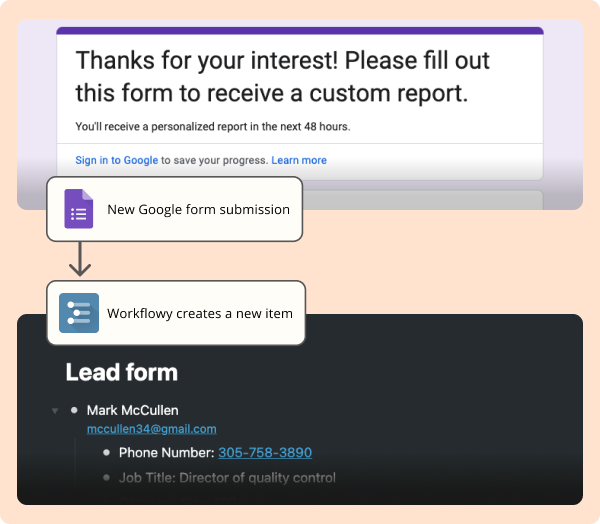
Say you’re in sales and use a google form to handle requests for more information. Now those submissions will show up automatically in your account ready for you or your team to start working on them directly in Workflowy – no more checking emails or google sheets for new leads.
Share your zaps with us ⚡️
We would love to know how you’re using the zapier integration and share your most useful flows with the rest of the Workflowy community. Please share those zaps in the comments so we can add them to our growing library.
See you in the next one.
It would be very nice to have the same integration with N8N!!!
Zapier is charging 18$ per month for webhook! Am dying over here because I can’t use the macOS tool Alfred to quickly add tasks to Workflowy. Why can’t we just use the same “API” that Zapier is enabling? I’m not scared to write a gigantic Python script if I have to, but I really need to make my workflow faster.
Wondering the same thing. Super cool to see positive progress in this arena!
This is the way.
Hey Leon, we’re working on making our api more accessible to other developers to build things with.
Please! It would be very nice to have integration with N8N!!!
Please make the full API available. It’s been requested 7 YEARS ago.
API – Workflowy (zendesk.com) is the 3rd most voted feature request in case you need some evidence.
Does this mean Workflowy finally has an API?
I canceled my Workflowy Pro account and moved to Dynalist due to the lack of an API, but with a functioning one, I would consider moving back.
Just curious, anything you’re not liking from Dynalist?
This is a game-changer. Being able to push summaries created by ChatGPT right into Workflowy has revolutionized my work and note-taking. I’m thinking of new ways to use this every day. Bravo!
Love using it so far but please add image support for screen shots, etc. Image attachments come in from zapier as huge links. When you click it it downloads a picture that you then need to open. The experience is unusable on mobile and barely usable on desktop.
[…] […]
This is a great feature and it’s only January. I love how the team is adding features while remaining true to the essence of the Workflowy app… Has anyone set up an iOS shortcut that asks for input and then adds this to Workflowy? I’ve tried, but I get lost mapping the content to Workflowy.
Great! Do you plan the integration with make.com as well? That would be Uber-Great.
WOULD LOVE THIS
Amazing. I never expected this. I stopped using Zapier due to cost but would love to connect directly via API, or Pabbly, or Active Pieces, or Make but I understand this alone is a big step. WF is an amazing app even without this. Thank you.
Will we get a complete API in the future as well?
Hey Jakob, that depends on how much interest there is around one.
Just wanna chime in that I’d love to see an API so that the unofficial https://intend.do/and/workflowy integration can become an official one with more secure authentication and faster performance!
Rodolfo,
not sure if the marketing talks to the prod team at Workflowy 😉 but here’s a 7-YEARS OLD feature request voted for by multiple people myself included.
API – Workflowy (zendesk.com)
Yes please to an API! Even something that exactly mimics this Zapier release but that I could call myself would be a game changer.
Zapier doesn’t have free webhooks and I’d really like to just use iOS Shortcuts with the API.
I am definitely interested in a full API
This is one of the best new features by Workflowy. Congrats, team!
Are there any plans to make it where someone could share only selected nodes?
For instance, I’m building multiple homes and have a certain subcontractor #d with several items on each home. When I search that #subcontractor, I’m not able to send them only their list, it sends the entire list.
You should be able to mirror nodes into a dedicated subcontractor node, and share that node with him.
Excelente. Esto puede ser de gran ayuda a quienes ya trabajan con Zapier, entre los cuales no me incluyo, pero, esto me motiva a hacerlo. Gracias por el trabajo a favor de los usuarios de WF
I am happy about this feature but sad that I am using it as a clunky workaround to the “share to inbox” iOS workflowy bug. Any timeline to fix this?
+1 to this. I share to Inbox on Workflowy inside iOS and I’m prompted to log in and after logging in, the item is not added to Workflowy.
I get that behavior when I tap “Save to workflowy”. There is also a related feature to share a link to workflowy. See my reply below.
Could you provide some more details about the ‘share to inbox’ iOS bug Pete?
I am happy that you responded. I can email you a video but here are steps to repro:
Open Chrome on iOSTap share in the address barSelect other and then Workflowy in Apps listSave a link to workflowy screen is presented with link and form to fill optional text. It says “This will be saved to Home > Inbox” in Workflowy. Tap send iconSee success messageNavigate to workflowy – no inbox bulletExpected result – see link under inbox bullet
iPhone 12, iOS 17.2 – first noticed this over a year ago
NOTE: This is different from the “Save to Workflowy” option that you can find by scrolling down the page after step 2.
Thanks for the detailed response, could you please email me a recording to help our team debug? You can send it to rodolfo@workflowy.com
Sent 🙂
Any plans to integrate with ifttt.com?
Not at the moment, but it really depends on how much interest and use the Zapier integration receives.
+1 for IFTTT!
OOOOMG been waiting for this for ages! Exciting stuff
This will help me smooth several parts of my daily work. Thank you.
I would love to know when/if we will be able to push to zapier. Thanks!
Het Adam, it really depends on how much interest there is around the integration. A lot of interest and use would push us towards expanding the capabilities.
+1 , would make a big difference to me.
[…] […]